Internal operations system
MK Creative OS Case Study
MK Creative OS is a custom internal operations system built for project tracking, production visibility, finance reporting, approvals, notifications, management dashboards, and day-to-day team coordination.
Internal operations system
Situation
MK Creative needed an internal system that could give teams and managers a clearer view of projects, production stages, finance activity, approvals, notifications, and reports.
Workflow evidence
This case shows how MK Creative OS turns a business problem into product structure, not just a set of attractive screens.
What it proves
This story points from the visible product into the delivery discipline behind it.
MK Creative OS Case Study proof notes
This mk creative os case study helps buyers inspect the product, the process while the constraints, and the delivery choices behind the work.
Challenge
Operations workflow
Screenshots
Dashboards
Finance visibility
Approvals
Reporting
FAQs
Project at a glance
These facts give the case enough shape before the deeper sections begin.
Project
MK Creative OS
Domain
Internal operations, projects, production, finance, approvals, notifications, and reporting
Evidence available
Dashboard screenshot, project workflow, finance visibility, with leadership reports model
Related services
Custom software, workflow systems, dashboards, business automation, and reporting
Evidence standard for this case.
A useful case study should help buyers learn from the work without pretending to know private results that have not been approved for publication.
What is public on this page
The case explains the product or project context, the operating problem, visible screens where available, related workflows, and lessons that can be shared without exposing private client information.
What is not claimed
The page does not invent revenue gains, percentage improvements, client quotes, awards, user counts, or confidential business results. Those details should appear only when approved and accurate.
What would strengthen the case later
Approved metrics, named client quotes, rollout notes, before-and-after process examples, training feedback, support history, and performance data would make the evidence stronger over time.
Screenshots
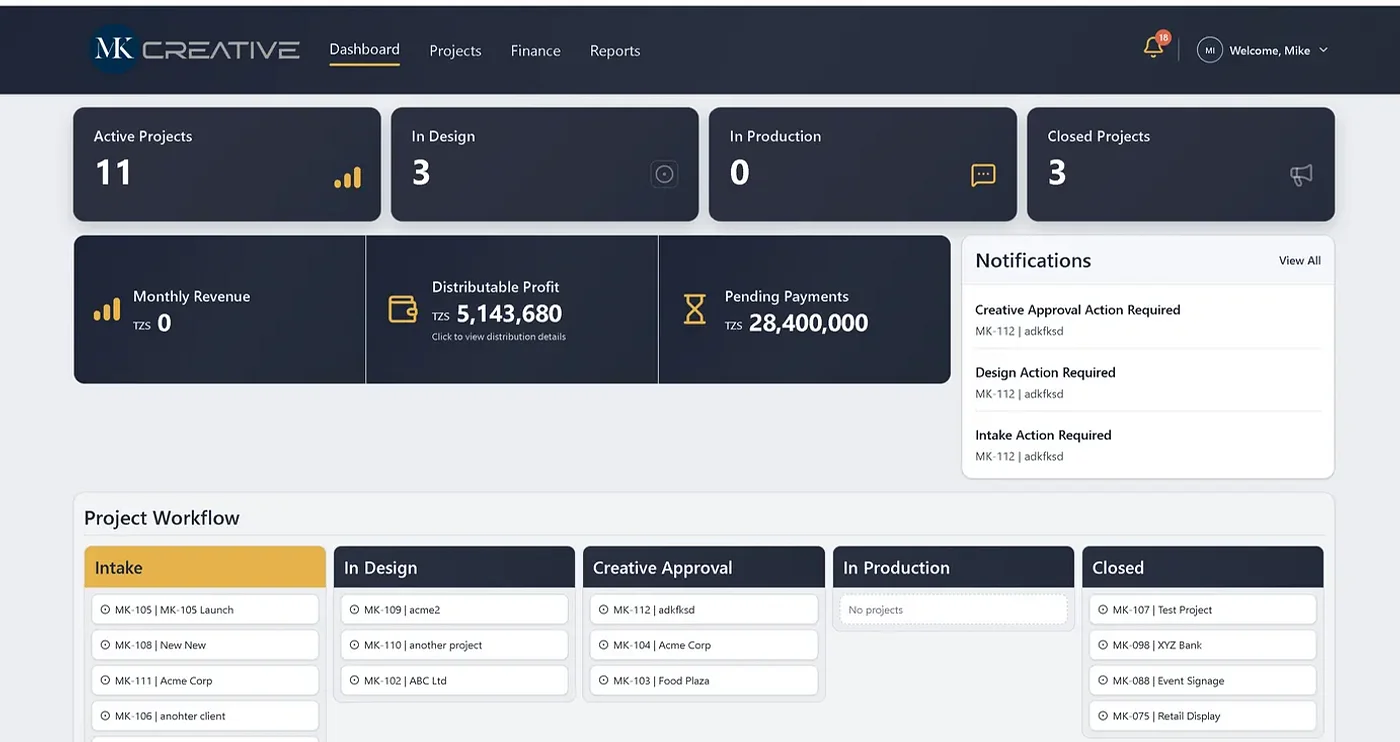
Product evidence makes the story easier to trust.

Walkthrough
How the product works in real operating steps.
Project workflow
- 1Create or review active projects
- 2Track work by design, approval, production, and closed stages
- 3See notifications for required action
- 4Use dashboard summaries for management visibility
Finance and reporting flow
- 1Review monthly revenue and distributable profit signals
- 2Monitor pending payments
- 3Connect finance items to project activity
- 4Use reports for management review
01 / Internal operating system
MK Creative OS is a management visibility story, not just a dashboard story.
The internal system began with a familiar operations problem: work was happening, but leadership needed a cleaner view of status, approvals, production, finance, and reporting. When projects move through design, approval, production, payment, and delivery, small delays can hide until they become management problems.
The useful product question was not how many screens could be built. It was what decisions managers needed to make faster. Active projects, monthly revenue, distributable profit, pending payments, notifications, and production stages all needed to become visible in one operating environment.
The system therefore required a structure that respected daily work. Project stages had to be clear. Financial signals had to connect to project activity. Alerts had to point to action rather than noise. Reports had to answer management questions instead of simply listing data.
The value of MK Creative OS is coordination. It gives the team a shared operating picture and gives leadership a stronger base for review. The case shows why internal systems should be designed around decisions, not around menus.
02 / Management cockpit
The internal system needed to turn daily activity into reviewable signals.
Project work creates many small signals: stage changes, approvals, payments, notifications, and production movement. When those signals are scattered, leaders rely on verbal updates.
MK Creative OS brings those signals into a shared environment so the team can see what requires attention. That changes management from asking for status to reviewing evidence.
The lesson is that internal tools should be designed around the decisions people make every week, not only around the data they store.
03 / Operations cockpit
The internal system had to turn daily activity into reviewable signals.
Project work creates many small signals: stage changes, approvals, payments, production movement, notifications, and management notes. When those signals are scattered, leaders rely on verbal updates.
MK Creative OS brings them into a shared environment so the team can see what needs attention and what is already moving.
The lesson is simple: internal tools should be designed around weekly decisions, not only around the data they store.
04 / Internal visibility
MK Creative OS turns scattered project activity into management signals.
Operational software becomes useful when leaders can review work without chasing every update. Status, production movement, approvals, finance items, and notifications need to become visible in one operating view.
The case matters because it shows a common internal-systems problem: the business already has activity, but the activity is too scattered for clean supervision.
05 / Initial pressure
MK Creative OS responds to work that needed a better operating model.
MK Creative needed an internal system that could give teams and managers a clearer view of projects, production stages, finance activity, approvals, notifications, and reports.
The page frames MK Creative OS as business infrastructure for people doing the work every day.
06 / The challenge
The old workflow needed more than another spreadsheet.
Internal operations become harder to manage when project status, design actions, approvals, finance items, with leadership reports live in disconnected places.
The product needed rules aligned with its operating model, so teams were not forced to work around a tool.
07 / What had to be handled
The product needed enough structure to survive daily use.
The build needed enough detail to prevent vague ideas from becoming expensive surprises.
The delivery becomes easier to estimate when the constraints are named directly.
- project visibility
- production workflow
- finance reporting
- approval actions
- manager dashboards
08 / Our approach
The workflow had to lead the interface.
Product work started by naming flow, records, handoffs, and decisions that shaped the system.
The product needed to be usable and operationally honest at the same time.
- map the daily operating flow
- separate project stages clearly
- make finance and approval signals visible
- design dashboards around management questions
09 / Architecture view
The product needed connected records, roles, and reporting.
The technical shape has to keep MK Creative OS understandable for users, managers, and the support team.
Each MK Creative OS module needed a clear responsibility so improvement would not become a rebuild.
- dashboard
- projects module
- project workflow board
- finance section
- approval notifications
- reports
10 / Key features
The feature set had to serve real user actions.
Useful features remove repeated friction rather than adding new administration.
A buyer should be able to connect each capability to a practical use case.
- active project counts
- production stages
- payment visibility
- approval alerts
- management dashboards
- report views
11 / Launch preparation
The product had to survive practical use, not only demos.
The details that looked minor in planning often become the difference between adoption and frustration.
Milestone reviews, demos, testing, and feedback cycles help MK Creative OS improve before wider rollout.
12 / What improved
MK Creative OS is useful when repeated work becomes easier to manage.
MK Creative OS should give the workflow more dependable for the people who rely on it.
The case connects operational insight to product detail so the work does not feel abstract.
- clearer project coordination
- better management visibility
- faster awareness of finance and approval items
- a stronger base for internal reporting
13 / Practical lessons
The lessons help the next buyer ask better questions.
Good case studies show judgment: what was difficult in MK Creative OS, what mattered more than expected, and what should improve next.
The learning points connect MK Creative OS to future custom software decisions.
- internal systems must match daily habits
- dashboards are useful when they answer management questions
- notifications should point to action rather than create noise
14 / Product evolution
Future work should come from evidence.
MK Creative OS can keep gaining value as the team learns from support, usage, and new business strain.
Good prioritization asks what will reduce effort, improve accuracy, support customers, or clarify management action.
15 / Relevant services
MK Creative OS connects platform thinking to delivery model.
The product points to broader capability: workflow systems, mobile and web interfaces, databases, reports, integrations, hosting, and support.
A serious buyer should notice the operating questions behind the build, not only the interface.
The project type may change, yet the need for clear scope and usable systems stays the same.
- Product planning
- Operational dashboards
- server care and support
16 / Practical takeaway
A good partner should explain the pressure behind the product.
Capability matters, but judgment turns capability into useful software.
MK Creative OS becomes credible when project visibility, production workflow, finance reporting, approval actions, manager dashboards are handled directly rather than softened into generic claims.
That is the standard Entice Technologies applies: show MK Creative OS, explain the trade-offs, and make practical value clear.
- Inspect the product
- Ask about support
- Review the rollout plan
MK Creative OS Case Study build context
The scope explanation keeps the case useful without adding unsupported claims.
Challenge
MK Creative needed a clearer way to coordinate projects, approvals, finance visibility, production status, notifications, and reports. The system had to support daily work rather than sit apart from it.
- Project tracking
- Production status
- Finance and approvals
Operations workflow
Entice Technologies shaped MK Creative OS around the way teams move work forward: dashboards for visibility, project boards for progress, finance views for payment awareness, approval flows for decision points, and reports for management review.
- Project dashboards
- Approval workflows
- Management reporting
Business value
The system gives the team one place to see active work, design actions, production movement, finance items, and management summaries. That makes coordination easier and gives leaders a clearer operating view.
- Team coordination
- Daily visibility
- Cleaner reporting
FAQs
The answers strengthen the case easier to compare with related services and products.
What does MK Creative OS manage?
Projects, production stages, finance visibility, approval workflows, notifications, reports, and management dashboards.
Is this custom software or a website?
MK Creative OS is custom internal business software, designed for daily operations rather than public marketing.
Can your team build similar operations systems?
Yes. We build dashboards, workflow systems, approval tools, reporting portals, and internal business platforms.
Related paths from this delivery
These pages connect the project to related products, services, and industry needs.
Internal operations system
Plan your operations system
Start with your projects, approvals, reports, and daily workflow.